Running RADMC-3D with AggScatVIR
One primary application of AggScatVIR is to model total-intensity and polarized scattered light from protoplanetary disks and debris disks. Our database has been designed to allow users to easily conduct radiative transfer simulations with RADMC-3D, a publicly available radiative transfer simulation code. To use one of our dust models with RADMC-3D, place the corresponding file (dustkapscatmat_XXX.inp) in a directory that
RADMC-3D will be running. Once the other necessary input files have been properly prepared (as described below), you should be ready to run RADMC-3D.
Quick demo using radmc3dPy
Please ensure that RADMC-3D has been installed on your system before proceeding. If not, refer to the RADMC-3D manual for installation instructions. Once RADMC-3D is installed, go to the directory where you wish to run RADMC-3D. Please select one of our dust model files (dustkapscatmat_XXX.inp) and place it in your working directory. For example, we have created a local copy of
dustkapscatmat_FA19_Nmax2048_100nm_amc_chop5.inp in python/notebooks/. To prepare the other necessary files for RADMC-3D, we use radmc3dPy, which is also part of RADMC-3D.
We first import the radmc3dPy package:
[1]:
from radmc3dPy import *
Then create a default parameter set for a typical protoplanetary disk:
[2]:
analyze.writeDefaultParfile('ppdisk')
Writing problem_params.inp
It would be safe to set the wavelength grid in the radiative transfer calculation (specified in wavelength.inp) to be consistent with the wavelength coverage of the dust file provided by this database. Therefore, let’s set the short and long wavelength ends to be 0.554 and 3.78 \(\mu\)m, respectively.
[3]:
nw='[1,1,1,1,1,2]'
wbound='[0.554,0.735,1.040,1.250,1.630,2.180,3.780]'
To create a scattered-light image using RADMC-3D, we need a dust temperature file (dust_temperature.dat or dust_temperature.bdat) in the working directory. RADMC-3D has a function (mctherm) to determine the radiation equilibrium temperature of dust particles, and the dust temperature file will be generated after running it. However, the wavelength coverage of this database is too narrow to determine the correct temperature. Therefore, it is recommended that each user creates the dust temperature file manually.
In this section, we simply omit the contribution of thermal emission, and therefore we set the dust temperature to 0 K everywhere in the simulation cells. To make such a dust temperature file, we will run mctherm without lauching any photon packets (nphoto='int(0)').
We can create the necessary input files for RADMC-3D by running the following command:
[4]:
setup.problemSetupDust('ppdisk', mdisk='1e-4*ms',rin='10*au',
                      nw=nw,wbound=wbound,xbound='[10.0*au,10.5*au, 100.0*au]',\
                       nz='[64]',\
                       dustkappa_ext ="['FA19_Nmax2048_100nm_amc_chop5']",\
                       nphot='int(0)',nphot_scat='int(1e6)',scattering_mode_max=5)
Writing problem_params.inp
Writing dustopac.inp
Writing wavelength_micron.inp
Writing amr_grid.inp
Writing stars.inp
-------------------------------------------------------------
Luminosities of radiation sources in the model :
Reading wavelength_micron.inp
As calculated from the input files :
Stars :
  Star #0 + hotspot        : 3.044969e+33
Continuous starlike source : 0.000000e+00

-------------------------------------------------------------
Writing dust_density.binp
Writing radmc3d.inp
Please make sure to (i) specifiy the dust model name (dustkappa_ext ="['FA19_Nmax2048_100nm_amc_chop5']") and (ii) include scattering_mode_max=5.
Now we are ready to run RADMC-3D. Let’s start running mctherm first (Again, no photon packets will be launched in this step. This is just to create a dust temperature file that is needed to proceed to the scattering Monte Carlo stage).
[5]:
import os
os.system('radmc3d mctherm')
[5]:
0
This command ends up with creating a dust_temperature file with 0 K everywhere (dust_temperature.bdat).
We are now ready to create a scattered-light image of the disk by performing a scattering Monte Carlo simulation. Let’s do imaging at an optical wavelength (0.6 \(\mu\mathrm{m}\)) and a disk inclination angle of 55 degrees:
[6]:
image.makeImage(npix=300., wav=0.6, incl=55, sizeau=250.,stokes=True)
Executing RADMC-3D Command:
radmc3d image npix 300 incl 55 sizeau 250.0 lambda 0.6 pointau 0.0  0.0  0.0 fluxcons stokes
[6]:
0
It will take about 50 seconds to complete using a single core, and image.out will be created in the end. The file contains intensity of the four Stokes components at each image pixel. The resultant total-intensity disk image looks like this:
[7]:
import matplotlib.pylab as plb
im = image.readImage()
image.plotImage(im, au=True, log=True, saturate=1e-5,maxlog=10,cmap="magma")
Reading image.out
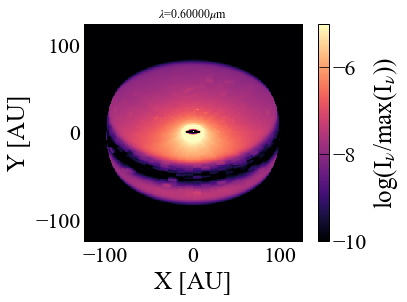
[7]:
{'implot': <matplotlib.image.AxesImage at 0x7fcacb6dbfa0>,
 'cbar': <matplotlib.colorbar.Colorbar at 0x7fcacb69fac0>}
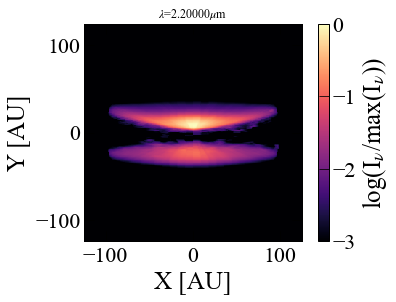
Let’s try other parameters: at a wavelength of \(\lambda=2.2~\mu\)m and a disk inclination angle of 85 degrees.
[8]:
image.makeImage(npix=300., wav=2.2, incl=85, sizeau=250.,stokes=True)
Executing RADMC-3D Command:
radmc3d image npix 300 incl 85 sizeau 250.0 lambda 2.2 pointau 0.0  0.0  0.0 fluxcons stokes
[8]:
0
After completing another round of the second hand of the clock, we obtain the following image:
[9]:
im = image.readImage()
image.plotImage(im, au=True, log=True, maxlog=3,cmap="magma")
Reading image.out
[9]:
{'implot': <matplotlib.image.AxesImage at 0x7fcad0a30850>,
 'cbar': <matplotlib.colorbar.Colorbar at 0x7fcad0be6130>}
These are the model images of scattered light of a disk containing fractal dust aggregates with sub-micron grains, although more photon packets/finer spatial grids would be needed to improve the image quality.
Preparation of input files and caveats
For those who are not using radmc3dPy, here we summarize the points to consider when generating the input files. Of the RADMC-3D input files, the following three are relevant to using our dust model: radmc3d.inp, dustopac.inp, wavelength.inp.
dustopac.inp sets how RADMC-3D will read dust input files. To use the dustkapscatmat_XXX.inp file, the inputstype in dustopac.inp must be set to 10. The extension XXX of the dust file must also be set in this file.
radmc3d.inp is where the scattering Monte Carlo calculation mode can be set. To run the scattering Monte Carlo calculations taking into account all Stokes parameters, scattering_mode_max = 5 must be set.
wavelength.inp contains the wavelength grids used in the radiative transfer calculation. Since the scattering Monte Carlo calculation is monochromatic, there will be no problem if the wavelength used for imaging is within the wavelength range of the dust file. However, if mctherm runs in advance as done in the above example, the wavelength grid is better to have the same wavelength coverage as a dust file; otherwise, RADMC-3D might cause some internal errors when reading dust opacity files.
Important
Thermal Monte Carlo runs: As already mentioned in the above example, dust files provided in AggScatVIR have a wavelength coverage too narrow to determine radiation equilibrium temperature via thermal Monte Carlo calculations (mctherm in RADMC-3D). Therefore, it is recommended to use the package for monochromatic scattering Monte Carlo radiative transfer simulations.
Warning
Models with incomplete wavelength coverage: The following models only have the wavelength coverage of 1.04-3.78 microns. In other words, the data sets at 0.554 and 0.735 microns are missing: FA19_(Nmax)4096_100nm_amc, FA19_(Nmax)4096_100nm_org, FA15_(Nmax)1024_100nm_amc, FA15_(Nmax)1024_100nm_org, FA13_(Nmax)512_100nm_amc, FA13_(Nmax)512_100nm_org, FA11_(Nmax)256_100nm_amc, FA11_(Nmax)256_100nm_org.
See also
Chopping forward scattering: Dust particles much larger than the wavelength may exhibit a strong forward scattering, which may cause some issues in your simulations, such as poor image quality. One approximate way to mitigate this issue is to chop the forward scattering peak off. For this purpose, AggScatVIR offers the dustkapscatmat_XXX.inp file with two different chopping angles: 5 and 10 degrees. When you encounter such an issue, please consider using those files.